Built by The Ease Co
Invoe manages the work before the sale.
You buy from brands. Your customers buy from you. Invoe manages everything in between: the purchase orders, product preparation, receiving, invoices, and work to get products ready for Shopify. We built it for independent retailers buying from many vendors.
5.0 on the Shopify App StoreBuilt for multi-vendor retailers

Our retailers needed help beyond the project.
We’ve been consulting with retailers since 2023. A big project can help a shop open, move systems, or rebuild its operations. But the orders, deliveries, product details, and invoices keep coming. Our retailers needed a better way to manage that everyday work.
We launched Invoe in 2026 to give that work a home. It brings what we learned running Amor and working alongside other retailers into an inventory management app your team can use every day.
Two ways to get there
Let’s get your shop on Invoe.
Start with an order
Install Invoe from the Shopify App Store and start with an order. You can work through the setup at your own pace.
Start with InvoeDone with you
We help review your existing records, plan the setup, and teach your team the receiving and catalog routines. We agree what can be imported before starting a migration.
Talk to The Ease CoWho it's for
Built for multi-vendor retailers.
If this sounds like you, Invoe was built for you.
- You buy at markets like Atlanta, Dallas, Vegas, and High Point
- You work with 20-100+ vendors
- You receive inventory 3-6 months after ordering
- You're tracking POs on paper, spreadsheets, or sticky notes
- You've been burned by short shipments or wrong pricing
- You spend hours every week on data entry
The problem
The order is only the beginning.
You may place an order months before it arrives. The purchase order, product images, and invoice can all come from different places. Your team needs a way to keep them connected when it’s time to receive the delivery.
The details matter:
- Vendors ship short. You paid for 24 units, received 20.
- Pricing changes. The PO said $12, the invoice says $14.
- Shipping and other charges affect what each item costs.
- Late deliveries miss seasons. That summer line arrives in September.
Invoe keeps the incoming work connected so your team can check the delivery, follow up on differences, and prepare the products for Shopify.
Shopify sells it. Invoe gets it ready.
How Invoe works.
01
Upload your PO
Upload a photo, PDF, or CSV of your purchase order. Review the vendor, products, quantities, prices, and shipping dates Invoe extracts before carrying on.
02
Track what's coming
See everything on order in one place. Filter by vendor, expected arrival, or status. Know what's late before it becomes a problem.
03
Receive against it
Check a delivery against its purchase order. Record what arrived and any shortages, damage, or differences that need a follow-up with the vendor.
04
Know your true cost, then publish
Record shipping and other charges to understand landed cost. Prepare the product details and images, review them, and approve what goes to Shopify.
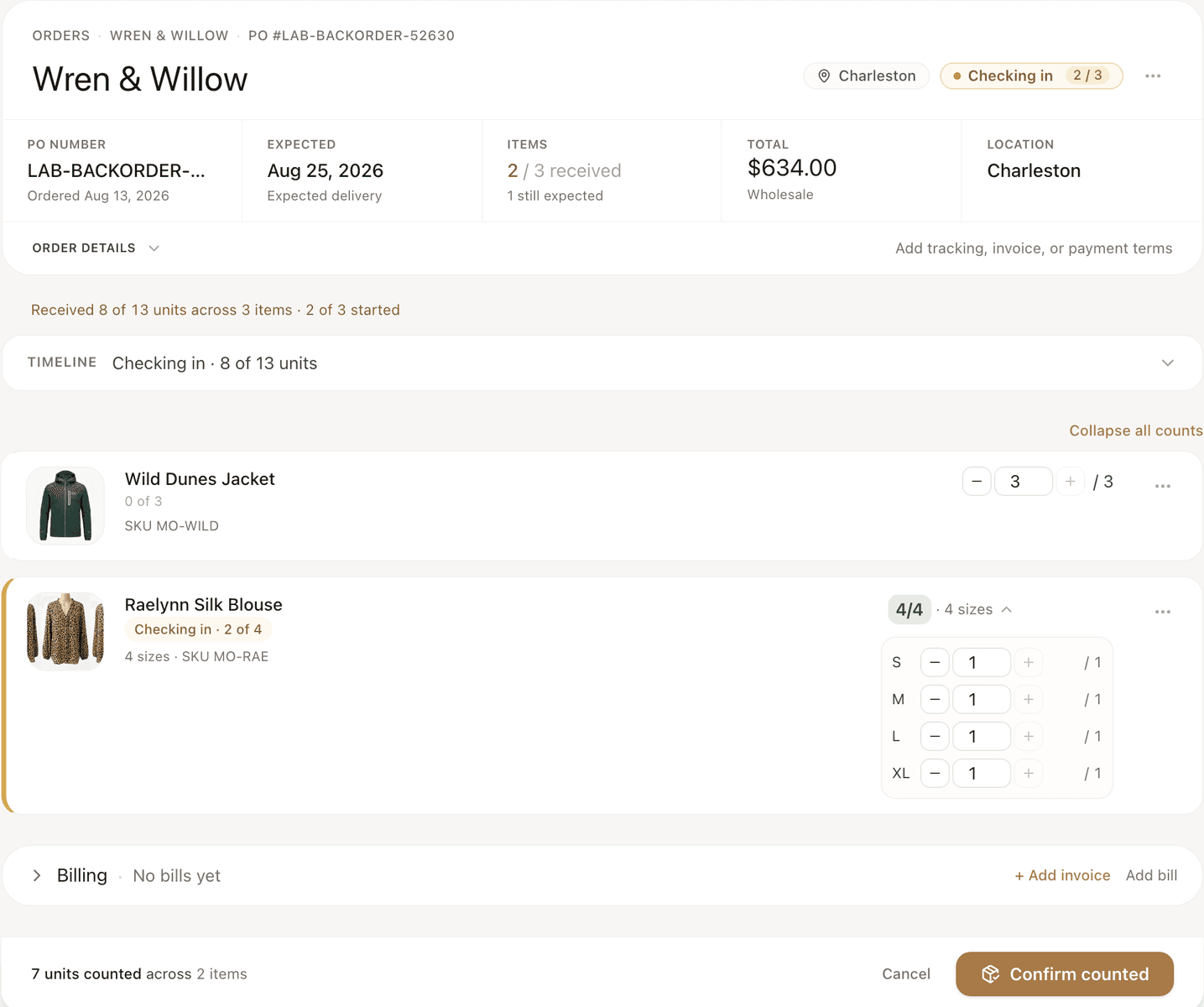
Keep the order in view
See what is coming, what arrived, and what is ready.
Keep purchase orders and expected deliveries together so the team can look them up.
Compare a delivery with the order and keep a record of differences for the vendor.
Gather the details and images, check the variants, and approve products for your store.
We were lucky enough to find Invoe before opening our store. This helped tremendously as new business owners, and new to this side of retail. Invoe provided us with vast knowledge to get started and then seamlessly got our POS system, inventory and brand online so we could focus on other aspects of building our brand.
Everything you need
Six things it does every day.
PO capture from anywhere
Extract order details from a photo, PDF, or CSV for your team to review.
Incoming inventory dashboard
See all POs, filter by vendor, status, or expected date.
Discrepancy detection
Flag short shipments, wrong items, pricing changes.
True landed cost
Add shipping, fees, damage. Know your real cost per unit.
Publish to Shopify
Send clean titles, variants, images, and SEO directly to your store.
Vendor scorecards
Track which vendors ship on time, ship complete, price accurately.
Where we come in
Want help getting set up?
We can help you set up Invoe, move your data, and get your team running. Tell us what you’re working with today, whether you’re changing systems, rebuilding your records, or getting ready for your first delivery.
Inventory & catalog migrations
We review the product and order information you have, agree what can transfer, and plan the import and checks.
Rebuilding inventory records
If you have lost access to inventory records, we help assess the available information and scope the operational rebuild.
Setup, automation & training
We set up Invoe around your receiving work and help your team practise using it.
See how Invoe fits your store.
Explore Invoe, or book a call with us to discuss your incoming inventory and the help you need.