My biggest takeaways, from customer recognition at checkout to getting ready for January inventory.
When I read Shopify Editions, I’m thinking about our clients and the work of running a specialty store. What will make their day easier? What will make shopping with them better? What helps them build a stronger business?
These are the updates I’m most interested in, along with a few things I’d make time for before the new year.
1. Expanded customer recognition is my biggest takeaway
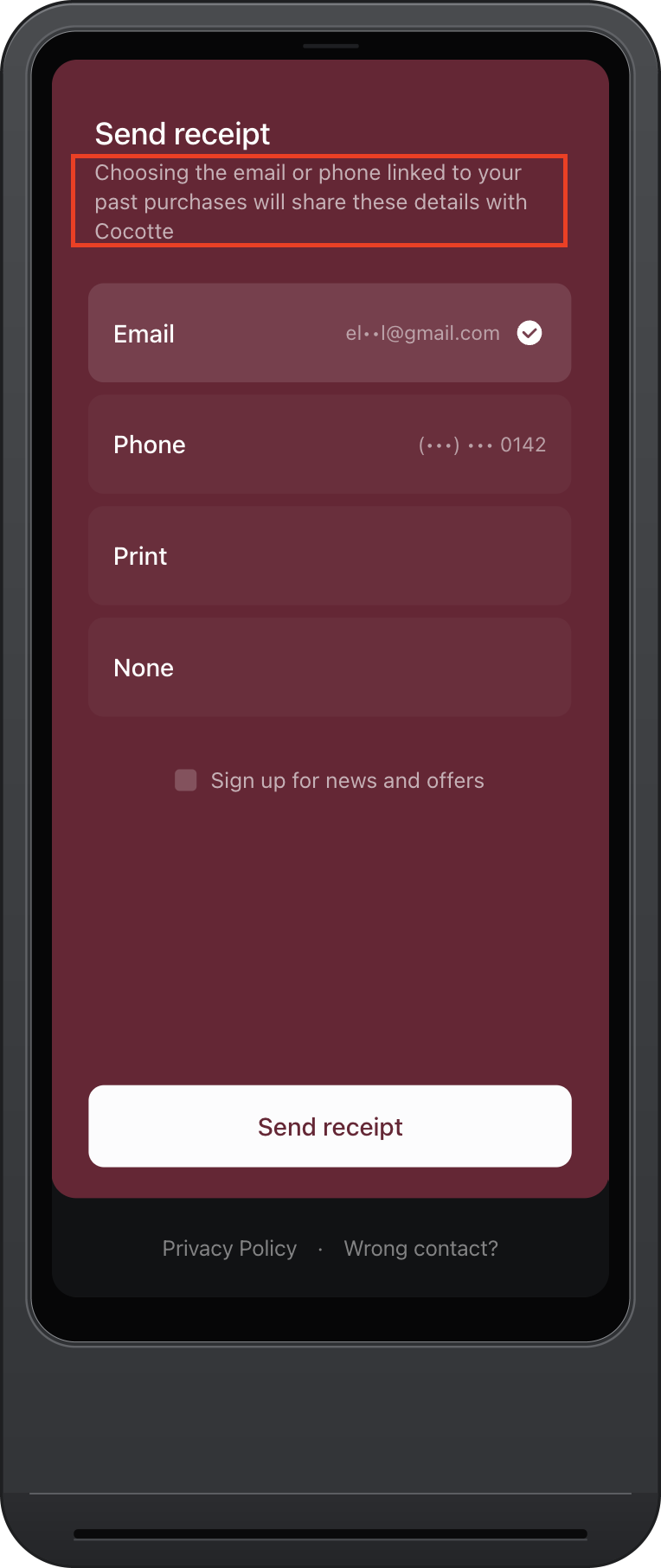
When I owned my store, we created incentive programs for our team to capture more customer information at checkout. We wanted to understand who was shopping with us and connect their purchases, whether they visited the store or shopped online. That information mattered well beyond the next marketing email.
But asking for it could interrupt a really good interaction. You’ve been chatting, helping someone choose something, and wrapping up the sale. Then you stop to ask for an email address, how to spell it, and whether you heard it correctly.
Shopify POS can now recognize more eligible customers through its network of hundreds of millions of people who have checked out with Shopify Payments. It presents masked contact details during receipt selection. When a customer chooses a digital receipt, they authorize those details to be shared with your store and connected to their purchase. Marketing preferences are also part of the receipt experience.
For me, this is huge. It helps you understand who’s shopping while asking less of your customer and your team at the end of the sale.
This is available to eligible merchants on POS version 11.17 or later. It’s on by default with a customer-facing display. Without one, you’ll need to enable customer receipt selection. Read Shopify’s customer recognition update.
2. Start planning January inventory counts in POS
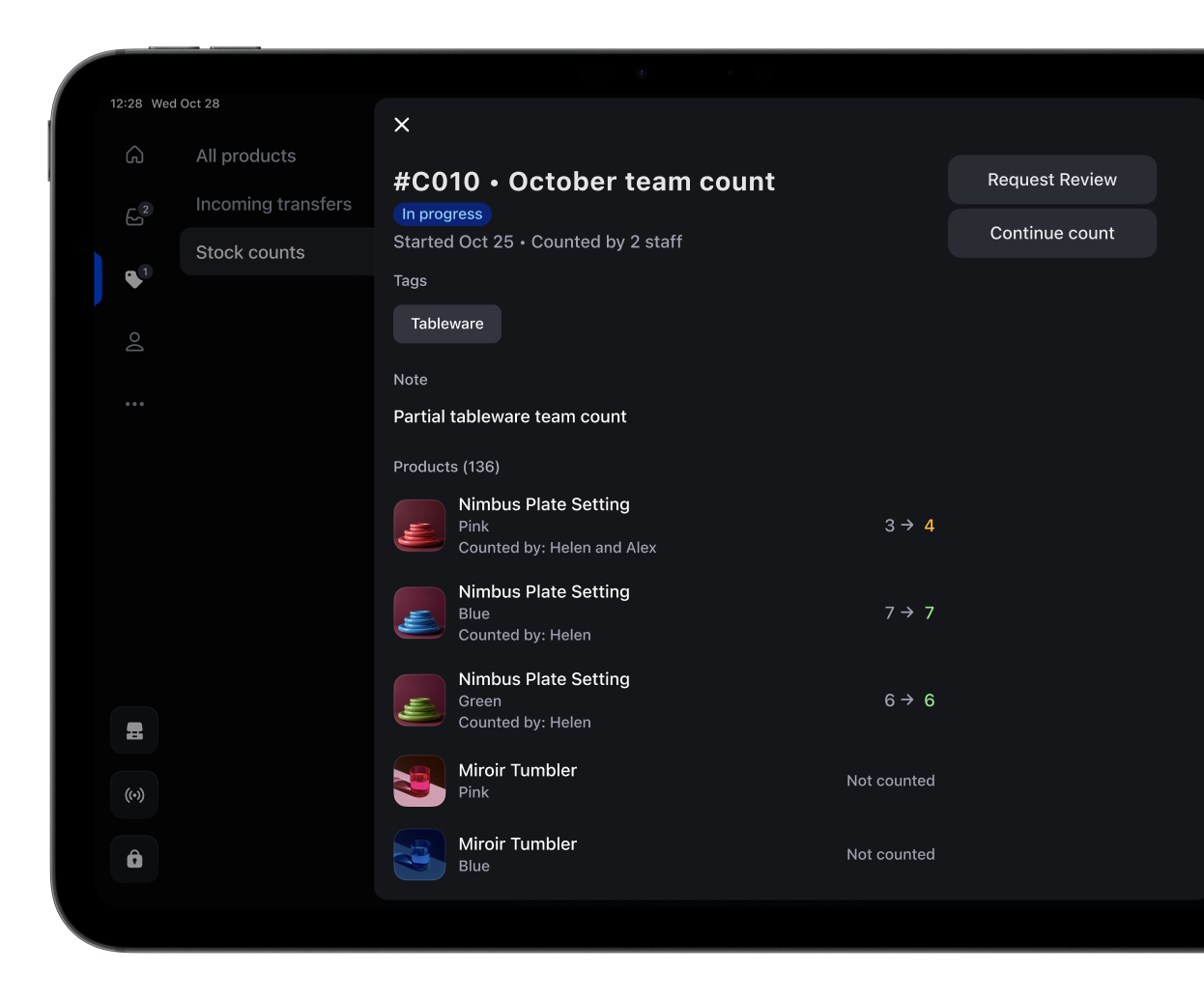
We’re already having this conversation with clients. January is a good time to check what’s actually on the shelves and reconcile it with what your systems say you have.
Shopify now lets you schedule stock counts in the admin and have your team complete them directly in POS. You choose the products and location, assign the work, then review discrepancies before approving changes to inventory.
I particularly like this for cycle counts. Today can be denim day. Tomorrow can be backpacks. You can work through your assortment in manageable groups and give someone clear responsibility for each count.
As more customers discover and shop specialty stores across different channels, accurate inventory becomes even more important. If someone is deciding whether to visit your shop for a particular item, you want to be confident it’s there. That’s part of how you build trust.
I’d plan at least some inventory counting for January, then decide how smaller counts can become part of your regular routine.
Counting in POS requires POS Pro at the location and POS version 11.16 or later. See how stock counts work.
3. Give shopping assistants a better understanding of your store
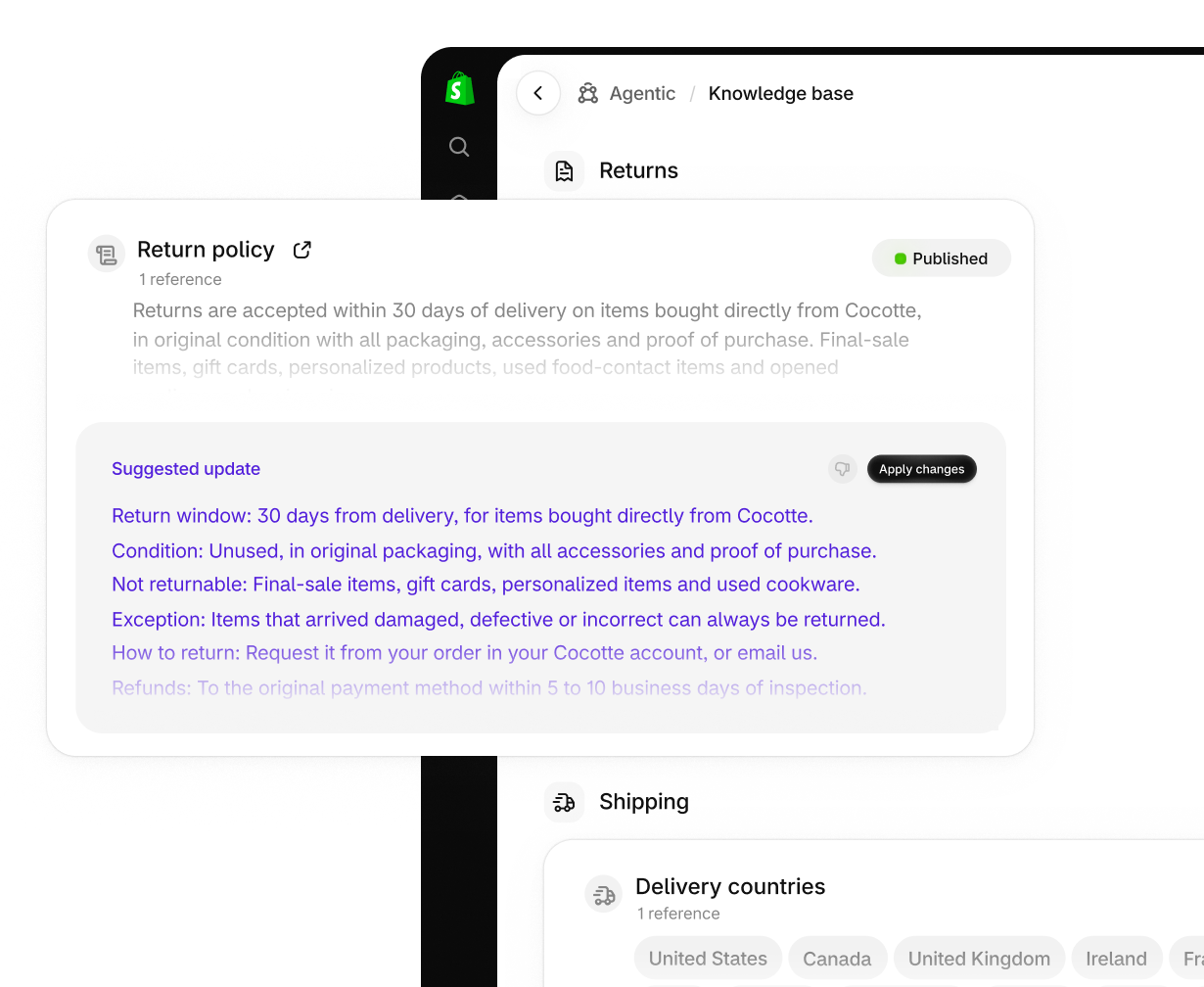
Shopify’s Knowledge Base is one I’d set aside an hour for soon.
It lets you review and publish information that shopping assistants can use when answering questions about your business. You’ll find it under Sales channels → Agentic → Knowledge Base.
I think this is a real opportunity for the people behind specialty stores to explain what makes shopping with them different. Include your policies and practical details, then think about the things you’d tell someone who walked through the door.
Do you offer same-day gift wrapping? In-store personal shopping? Can someone get help choosing a gift? Why did you open the store, and what guides the brands you carry?
If those services are available, explain how they work. Add your story and the people behind the business where that information belongs. Keep the same details clear on your website, too.
This gives shopping assistants more useful information to draw from when someone asks about a store like yours. The service and knowledge you already offer deserve to be part of that answer.
Check the facts and their publication status. Some information from your Shopify settings is already published, while facts generated from storefront scans need review and publication. Review Shopify’s Knowledge Base guidance.
4. Use online carts to support a more personal store visit
Authorized staff can pull up a known customer’s abandoned online checkout in POS and help complete the purchase in store.
I love the clienteling possibility here. A customer could choose the pieces they’d like to try before coming in, and your team could use that selection to prepare for their visit.
The detail to understand is how the cart becomes visible. The customer needs to enter their email address at checkout and leave it incomplete for at least ten minutes. Your staff also need the relevant permissions to view it.
If you’d like to offer this as a service, test that sequence with your team first. Agree how the customer will let you know they’re coming, then have someone pull the pieces and confirm what’s available.
It could be a lovely way to connect the convenience of browsing online with the personal attention someone comes to your store for. Read how online carts work in POS.
5. Make more use of Sidekick
We recommend getting familiar with Sidekick. It can help with many of the everyday Shopify questions that come up while you’re working, as well as tasks such as editing products, working with store data and building automations.
You can ask in your own words and give it context about what you’re trying to do. Review the answers and proposed changes, then refine them as needed.
We still want you to reach out to us. We love those conversations. But if you’re in the middle of a task and need help finding a setting or understanding how something works, Sidekick is a useful place to start. Explore what Sidekick can do.
I’m also interested in its ability to generate small apps for work inside your Shopify admin. A team task tracker is one example Shopify gives. If there’s a particular job you keep working around, it may be worth exploring.
App generation is available on Basic, Grow, Advanced and Plus through a desktop browser, with usage limits based on your plan. Build, preview and test the app before installing it. Learn about generating apps with Sidekick.
6. Keep an eye on Shopify’s email tools
Email marketing takes time, and the cost of another platform can be a significant consideration for a small store. I’m interested in how much retailers can now do with Shopify’s own email tools.
Shopify Messaging, formerly Shopify Email, is introducing more help with campaign preparation. When a recommended email series is available in your store, it includes messages, an audience and suggested send times for you to review, edit and schedule together.
That’s useful if the work of planning and building every campaign has kept email marketing on your list for another day. Review the audience carefully, since recommended series currently go to all email subscribers. See how recommended email series work.
There’s also an included monthly allowance of 10,000 emails on Basic, Grow, Advanced and Plus. Sending beyond that allowance has a cost. For a specialty retailer reviewing software expenses and what they actually need from email, it’s worth a look. Check the current email allowance and pricing.
7. Custom checkout fields are one to watch
I’m pleased to see more ways to collect information at checkout. In my store, we often had to put requests in the cart, and I found they could get missed.
Gift messages, delivery instructions and useful notes can all help your team look after the order properly. I’d like customers to have a clear place to leave that information while they’re completing their purchase.
This feature is still coming. Shopify says it won’t launch before or during Black Friday Cyber Monday. When it arrives, gift message and delivery instruction fields will be available beyond Plus, while the wider range of custom fields will require Shopify Plus.
The fields apply to the whole order. If you want to collect something more specific, such as a sizing question about one item, check how that information will reach your team before building a process around it. Follow the custom checkout fields rollout.
A few everyday improvements to look out for
Some updates are improvements to tools you already use.
- Faster POS checkout. Shopify lists fewer taps for cash and split payments, quicker receipt flows and improved card processing.
- A refreshed admin. Updated navigation and layouts are rolling out, with easier access to Sidekick. Shopify has also announced a filterable store activity log to help you see who or what made a change.
- A faster mobile app. The Shopify app has been rebuilt for iOS and Android, with smoother navigation and an updated design.
Keep your apps current and watch for these changes as they reach your store. Browse the Fall 2026 updates.
What I’d put on the calendar
I’d make time for the Knowledge Base now, check customer recognition at the register, and agree a January counting plan with the team.
If you’re considering bringing your website and point of sale together, or want help making more of your existing setup, we’re taking on one-on-one projects through The Ease Co. We’d love to hear what you have in mind for 2027.
Victoria Winter
The Ease Co